
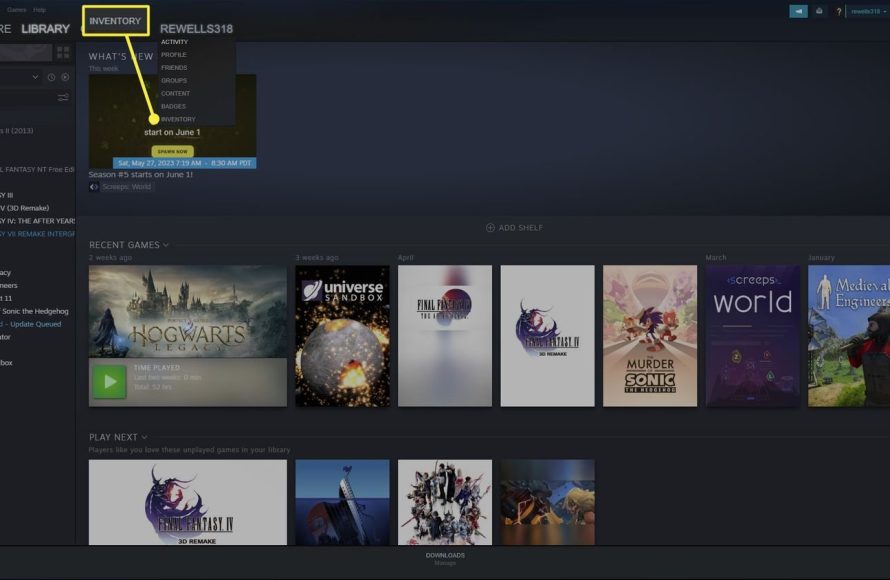
To trade a game on Steam, you must use the Steam trading system. Select the friend you wish to trade with, and then offer the game from your inventory for something they have.
Ever wanted to swap games with a friend? Trading on Steam makes it easy to exchange titles you no longer play for something new. This guide will show you how to trade a game on Steam. It’s a simple process once you understand the basics.
You can access the trading feature through your friend’s profile or your own inventory. You’ll see all your eligible items and games there. Then you offer the game for trade to your friend!

How to Trade a Game on Steam
Trading games on Steam can be a super cool way to get new games without spending more money, or to help out your friends. It’s like a digital swap meet! But, before you jump in, it’s good to know the ins and outs. Let’s break down how this works.
Understanding Steam Trading
First, let’s talk about what Steam trading actually is. Steam, a very popular platform for games, lets you exchange certain digital items with other users. This isn’t just about games; you can also trade things like in-game items (like weapons or skins) and trading cards. But, for this article, we’re focusing on trading games.
What Can You Trade?
The key thing to remember is that you can’t trade just any game. To be tradable, a game needs to be in your Steam inventory as a “gift.” This usually happens when you purchase a game as a gift for someone else, and that gift hasn’t been redeemed. Once a game is added to your library, it becomes a permanent part of your account and is no longer tradable. So if you want to trade a game you own, you’ll need to buy it as a gift first. Here is a little list to show you what we mean:
- Tradable Games: Games bought as gifts and stored in your Steam inventory.
- Non-Tradable Games: Games added to your personal Steam game library.
Getting Started with Steam Trading
Ready to start trading? Great! Here’s how you set things up:
Enabling Steam Guard
First and foremost, make sure you have Steam Guard enabled. Steam Guard is like a security lock that keeps your account safe. It’s a very important step for trading. If you don’t have it set up, Steam won’t let you trade. Here’s how to check or set it up:
- Open the Steam application.
- Click on “Steam” in the top left corner.
- Select “Settings” from the dropdown menu.
- Go to the “Account” tab.
- Look for “Manage Steam Guard Account Security.”
- Follow the instructions to enable Steam Guard, either through your email or the Steam mobile app.
Using the mobile app is usually the easiest and fastest way to enable Steam Guard.
Finding Trading Partners
Now that you’re secure, you need someone to trade with! Here are a few ways to find trading buddies:
- Friends List: The most convenient way to trade is with your Steam friends. You can check your friends list for those that are interested in trading games.
- Steam Trading Forums: Steam has community forums where people talk about and organize trades. Be careful when you interact with strangers on these forums!
- Third-Party Websites: Some websites are made specifically for Steam trading. While these can be useful, make sure they are safe before using them. Don’t share any login details with anyone!
- Reddit: Subreddits like r/SteamGameSwap are often used to connect people who are interested in trading games.
Understanding the Trading Interface
Once you’ve found someone to trade with, you need to use the trading interface. It looks a little like this:
- Your Inventory: On the left side, you see the things you own that you can trade.
- Their Inventory: On the right side, you’ll see the items your trading partner can trade.
- Trade Offer: This is where you select which items you want to give and receive.
You need to make sure you understand the interface well before trading. Take your time and double check everything! If you don’t understand something, don’t go through with the trade.
Making a Trade Offer
Let’s dive into the actual trade offer process. Here’s what you need to do:
Starting a Trade
To begin a trade, you can either:
- Right-click on your friend’s name in your friends list and select “Invite to Trade”.
- Go to their profile and click “More” and then select “Offer a Trade”.
Choosing Games
Once you are in the trading screen, you’ll see your inventory and your partner’s. Now, you select what you want to trade. Here’s how it works:
- Click on the game you want to trade from your inventory.
- It will appear in the trade offer window on your side.
- Your partner will pick an item from their side.
Make sure you’re trading the correct item and that your friend is offering the item you want. It’s very important to double check before clicking confirm.
Adding More Items
You can also trade multiple games or add other things like Steam trading cards to the same trade. Just click on each thing you want to add to the trade. The trade offer will clearly show everything both sides are giving and getting.
Reviewing the Trade
This is a very important step. Before finalizing the trade, take another look at everything. Be sure that:
- You’re giving the right game(s).
- You’re getting the correct game(s) or items.
- You understand what is happening in the trade.
Mistakes can happen, so double checking is always a good idea!
Confirming the Trade
Once you are absolutely sure everything is correct, click “Make Offer”. Steam will ask you to confirm again. You must click “OK” to accept the trade. If the trade is with a friend Steam will finalize the trade automatically. If it is with another user Steam will require you to confirm the trade through the Steam Mobile App. If you do not have the mobile app, Steam will send you an email with a link you need to follow and confirm.
Once the trade is accepted both you and your partner will have received the traded items.
Things to Consider When Trading
Trading games is fun, but it’s good to be aware of a few things before you dive in.
Fair Trades
A “fair” trade is where you and the other person are both happy with what you’re getting. Sometimes, games have different values. For example, a brand new game might be worth more than an older one. It’s good to research the value of the games you want to trade. Check out the Steam store to see the price of games before you start trading them.
Also, consider if you will actually play the game you’re getting. If you have a game that you know you’ll enjoy and you get rid of a game you might play later, that may not be a good trade for you.
Avoiding Scams
Sadly, some people might try to trick you when trading. Here are a few things to watch out for:
- Fake Trade Offers: Double check the items in the trade offer. Some people try to swap out the items you think you’re receiving with a cheaper or different item.
- Links: Don’t click links from people offering trades that might not look real. They might take you to fake websites.
- Too Good to be True: If a deal seems unbelievably good, it’s probably not real. Be very wary of these.
If something feels fishy, it’s best to walk away. Always trade with people you trust.
Trading Limitations
There are a few limitations you might run into:
- New Accounts: New Steam accounts sometimes have to wait a bit before they can trade. This is a security measure.
- Trade Holds: If you don’t have Steam Guard enabled for more than 15 days, there might be a delay on your trade. This is to help you if your account gets hacked.
- Region Locks: Some games are region-locked, meaning they might only work in certain countries. Make sure the game works in your region.
How to Check Your Steam Inventory
Before you trade, you might want to look at your Steam inventory and see what you own and what games are available to trade.
Accessing your Inventory
Here’s how you find your inventory:
- Open the Steam application.
- Click on your profile name at the top of the screen.
- Select “Inventory” from the drop down list.
Understanding your Inventory
You should see a list of all the items in your inventory here. You can switch between different categories to see what you own. Click on any item to see more details, like if you can trade it or not. The inventory is where you will see if a game is able to be traded or not.
This is a really helpful way to check your items and be sure that you are trading what you expect to trade. You can also look at the other users inventory and make a better decision if you want to trade with them.
Trading games on Steam is a fun way to get new games, but it’s also important to be safe and smart while doing it. Always make sure your account is secure and that you are trading with people you trust. Double check trade offers and always make sure you are happy with the items you are giving and receiving. If you do all this, you will have a great time trading your games.
How to Send a Trade on Steam! Send a Steam Trade Offer!
Final Thoughts
To trade a game on Steam, you first need to ensure that both accounts have Steam Guard enabled for at least 15 days. Then, find the friend you wish to trade with and initiate a trade from their profile. Select the game you want to offer and confirm the trade.
The recipient must accept it to complete the exchange. Remember, you can only trade eligible games. This process illustrates how to trade a game on Steam effectively and quickly.

