
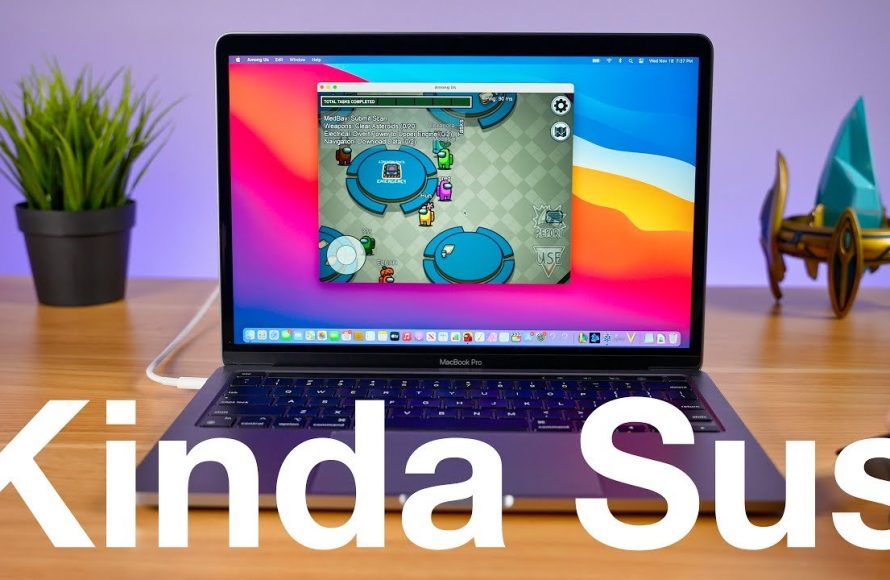
You can play a variety of games on a MacBook Pro, including many indie titles, strategy games, simulation games, and some popular AAA titles if your model has sufficient specifications.
Thinking about what games can you play on a MacBook Pro? Many people believe Macs are just for work, but that’s simply not the case anymore. You’ll find a growing library of games available.
The selection ranges from relaxing puzzles to more demanding action titles. So, yes, you can enjoy a fantastic gaming experience even on your MacBook Pro.

What Games Can You Play on a MacBook Pro?
So, you’ve got a shiny MacBook Pro and you’re wondering if it’s just for work and fancy photo editing? Think again! While it’s true that Macs aren’t always thought of as gaming powerhouses like some PCs, your MacBook Pro can actually handle a lot of fun games. Let’s dive into the world of Mac gaming and see what kind of adventures await you.
The Wide World of Mac-Compatible Games
Mac gaming has come a long way. It’s no longer just about simple puzzle games or solitaire. Today, you can find many cool games available directly through the Mac App Store, Steam, and other platforms. Here, we will explore various genres and titles that you can enjoy on your MacBook Pro.
Arcade and Platformers
If you love quick, fun, and often challenging gameplay, arcade and platformer games are a great place to start. These games are easy to pick up and play, perfect for a quick gaming session.
- Cuphead: This visually stunning run-and-gun game has a classic cartoon style and challenging boss fights. It’s a real test of your skills!
- Hollow Knight: A beautiful and atmospheric Metroidvania game with challenging exploration and combat. It has a big world to explore.
- Stardew Valley: While sometimes considered a farming sim, its also has a lot of adventure. This cozy game lets you farm, fish, explore caves, and make friends. You can get easily lost in it.
- Celeste: A challenging platformer with a heartfelt story and very precise controls. Don’t be fooled by the cute visuals, it’s quite hard, but very rewarding.
Strategy and Simulation
For those who enjoy a bit of thinking and planning, strategy and simulation games offer hours of engaging gameplay. These can be slower-paced, but require a great amount of thought.
- Civilization VI: A turn-based strategy game where you build an empire, research technology, and dominate the world. You can play as various historical leaders.
- Cities: Skylines: Design, build and manage your own city. A must-have for those who love city building sims. You can spend hours perfecting your roads and infrastructure.
- Crusader Kings III: A grand strategy game with a complex and compelling story. Control a dynasty through the ages, from marriages to wars, ensuring your family’s place in history.
Indie Games
The indie gaming scene is thriving, and there are many unique and creative games to try. These games often offer fresh ideas and innovative gameplay.
- Disco Elysium: A very unique RPG with a very detailed world and intriguing characters. You play as a detective with amnesia. Its writing is brilliant.
- Undertale: A charming and very memorable RPG. Your choices matter, affecting the world around you. You can either befriend the monsters or you can defeat them.
- Minecraft: An absolute classic for a reason. This creative sandbox game lets you build anything you can imagine. You can explore, create structures, mine and craft resources and have endless adventures with friends.
- Among Us: A fun social deduction game where you try to find the imposter on a spaceship. Fun to play with your friends.
AAA Games (The Big Ones)
While Macs haven’t been famous for running AAA games, things are improving. You can play many of these games on a Mac, especially the newer models, but this usually involves looking through system requirements, and considering settings.
Some big-name titles are increasingly available for Mac, usually through ports. A ‘port’ is when the game was originally made for one system (like PC), and then adapted to run on another one (like Mac). Some examples of AAA titles you can often find are:
- Divinity Original Sin 2: A very well-crafted RPG with deep turn-based combat and freedom of choice. Its story is rich and its gameplay is very rewarding.
- The Witcher 3: Wild Hunt: Explore the beautiful and immersive world of the Witcher. Its expansive open-world is full of detail and has a ton of quests and activities.
- Metro Exodus: A first-person shooter with a great story. Navigate a post-apocalyptic world. Its focus on story and atmosphere makes it immersive.
- Resident Evil Village: A survival horror game, with an intense and scary story. Play as Ethan Winters in a haunting village, it’s not for the faint of heart!
Free-to-Play Fun
Want some entertainment without spending a dime? There are many free-to-play games on Mac. These games often offer great gameplay and lots of content for free. A big note here though, is that some free games have purchases, and it’s up to you whether you want to buy some of those extra items in-game.
- Dota 2: A popular multiplayer online battle arena (MOBA) game where you play as a hero in a team to defeat the opponent team. It’s a competitive game with a ton of characters to choose from.
- League of Legends: Another very popular MOBA game with millions of players. Pick a champion and fight with your team to take down the enemy base.
- Fortnite: A very famous battle royale game where you build, fight, and be the last one standing.
- Genshin Impact: A free-to-play RPG with a beautiful open-world and amazing characters. A big world to explore and lots of quests to do.
Where to Find Games for Your MacBook Pro
Now that you know about the types of games, let’s discuss where you can actually find them.
The Mac App Store
The Mac App Store is the easiest place to find and download games. Think of it like the app store on your iPhone, but for your Mac. It’s built right into your operating system. Here, you’ll find a curated selection of games, both free and paid. Apple also checks all of the apps in its store, so there’s a higher degree of safety for the apps and games you download from there.
Steam
Steam is a very popular digital gaming platform. It’s like a huge online video game store. It has lots of games, and a large community of players. You can find many different kinds of games on Steam, from indie games to AAA titles. To use it, you’ll need to download and install the Steam application.
GOG (Good Old Games)
GOG focuses on providing DRM-free games, which means that once you download a game, you can usually play it without any additional software or constant internet connection checks. You’ll find both old classics and new games on GOG.
Other Platforms and Websites
There are many other ways to get games. You might find games directly from the developers, on sites like Itch.io (a popular platform for indie games), or through various digital game stores, or on sites like Fanatical. Don’t forget to check out the official websites of game developers. Some developers sell games on their own sites.
Factors Affecting Your Gaming Experience
It’s good to note that not all MacBooks are equal, and your experience will depend on your specific machine. Here are a few things that can change how your game runs:
MacBook Pro Model
The specific model of your MacBook Pro matters a lot. Newer models with better graphics chips will generally play games better than older ones. Check what kind of processor and graphics your machine has. Apple’s newer ‘M’ chips (M1, M2, M3 etc) can often run games better than previous Intel Macs, because they’re more efficient. Check your ‘About This Mac’ menu to know exactly what your MacBook has.
Graphics Card
The graphics processing unit (GPU) is what renders the graphics in a game. It’s like the engine for the visuals. A dedicated graphics card, or one built into the chip (like the ones in Apple’s M series processors) can make a big difference in how well your games perform. If your MacBook Pro has integrated graphics (graphics are part of the main processor), it will generally handle less demanding games more effectively.
RAM (Memory)
Random Access Memory (RAM) is like short-term memory for your computer. More RAM will usually help games perform better, especially if you have other apps open at the same time. 16GB of RAM is generally great for most games, though more can always be helpful.
Storage Space
Make sure you have enough storage space for the games you want to download. Some games, especially AAA games, can take up quite a lot of storage space. A solid-state drive (SSD) will make games load much faster than traditional hard drives.
Operating System Version
Keep your macOS operating system updated, as newer versions can sometimes provide game-specific fixes. Often game companies are focused on supporting the most recent versions of Mac OS, so make sure that you are updated.
Game Settings
Almost every game will allow you to change the graphic settings. Lowering settings like resolution, shadows, or textures, can make a game run smoother, even if it doesn’t look quite as good. It’s always a good idea to check in-game settings and adjust them to fit your specific MacBook Pro.
Tips for Better Mac Gaming
Here are some tips to ensure you get the most out of gaming on your MacBook Pro:
- Close Unnecessary Applications: Close other applications while gaming to free up system resources. Don’t have too many tabs open in your browser, or other programs open in the background.
- Keep your Mac Cool: Macs can get hot during intensive gaming sessions. Make sure your laptop has good airflow so it doesn’t overheat. There are external cooling solutions too.
- Use a Gaming Mouse: While the trackpad is okay, a gaming mouse can offer better control. Many gamers use gaming mice for their additional buttons and adjustable sensitivity.
- Connect Headphones: Headphones or earbuds allow for a more immersive gaming experience, and avoids disturbing others around you.
- Check Game Requirements: Make sure your Mac meets a game’s requirements before buying it, paying close attention to the required graphics. Check the minimum, and recommended specs of a game.
- Use a Controller: Some games, particularly platformers, racing games, and action games, can play better with a game controller. Many popular controllers like Playstation and Xbox controllers, connect to Mac.
The Future of Mac Gaming
Mac gaming is rapidly improving. With the development of Apple Silicon (the M series processors), games are starting to run smoother, and with better efficiency. This is a trend that will probably continue as more games are optimized for Apple’s chips. There is an increased interest from developers to port games to Mac, so its expected the number and quality of Mac games will continue to get better.
In the end, while a MacBook Pro isn’t a hardcore gaming PC, it’s totally capable of running a wide variety of fun and engaging games. With more support from game developers, its gaming library will only get better. So, get your game on and explore your MacBook’s gaming capabilities!
Gaming on a Mac, FINALLY! 🙌
Final Thoughts
Many popular titles work flawlessly, from indie darlings to AAA games. You can play games through platforms like Steam and the App Store.
“What games can you play on a macbook pro?” The answer is varied; it depends on your specific model and its capabilities. It covers many genres; strategy, simulation, adventure, and more.
Ultimately, your experience with Macbook Pro gaming depends on your chosen games and personal settings. The available game library provides extensive options for enjoyable gameplay sessions.

