
You can play old Pokemon games primarily on their original consoles, emulators on computers and mobile devices, and occasionally on Nintendo’s Virtual Console or online services.
Remember those pixelated adventures and the thrill of catching ’em all? Many players are now asking where to play old pokemon games, wanting a taste of that nostalgia. Those classic games hold a special place in our hearts.
This article helps you navigate the various ways to relive those cherished moments. We will guide you through the different platforms available, allowing you to return to the world of Kanto, Johto and beyond.

Where to Play Old Pokemon Games
So, you’re itching to dive back into the world of classic Pokémon? That’s awesome! Maybe you remember the thrill of choosing your starter Pokémon, or perhaps you’re new to the retro gaming scene and want to see what all the fuss is about. Either way, you’ve come to the right place. Playing old Pokémon games can be super fun and also a great way to experience the history of the franchise. But where exactly do you get to play these amazing games? It’s not always as straightforward as popping in a new cartridge. Let’s explore all your options!
Embracing the Original Hardware
First off, let’s talk about the real deal: playing on the original consoles. This is how most of us first experienced Pokémon, and it’s a great way to get that authentic nostalgic feel. We are talking about the Game Boy, Game Boy Color, Game Boy Advance, Nintendo DS and Nintendo 3DS. Each of these consoles has different ways that we can play the old Pokémon games.
Game Boy and Game Boy Color
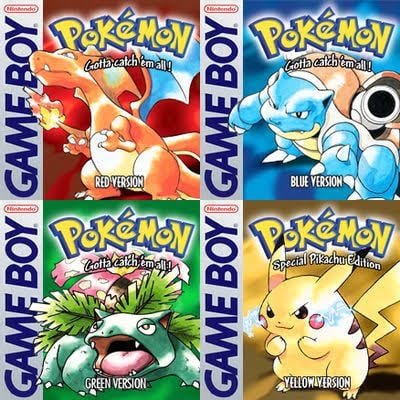
The very first Pokémon adventures began on the Game Boy and Game Boy Color. These systems gave us classics like Pokémon Red, Blue, Yellow, Gold, Silver, and Crystal.
What You Need: To play these games authentically, you’ll need a working original Game Boy or Game Boy Color, along with the game cartridges themselves.
Finding the Games: You might find them at retro game stores, online marketplaces like eBay, or maybe even in your attic! Keep in mind that older cartridges might need a little cleaning or a new battery, especially for saving your progress in older games like Gold, Silver and Crystal.
The Experience: Playing on the original hardware gives a totally different feeling! The chunky console, the tiny screen, and the 8-bit sounds all contribute to a unique vibe that you won’t find anywhere else. However, the screen might be small and not very bright, which might be difficult for some people.
Tips for Gamers: When buying an old game, look out for signs of damage or battery problems. Also, the Game Boy Color can play original Game Boy games, which is a great feature if you have both!
Game Boy Advance
Next up, we have the Game Boy Advance, which gave us Pokémon Ruby, Sapphire, Emerald, FireRed, and LeafGreen.
What You Need: To play these games, you need a Game Boy Advance, Game Boy Advance SP, or even the Nintendo DS or DS Lite, as they have backward compatibility. You’ll also need the game cartridges.
Finding the Games: These games are still relatively easy to find both online and at retro game stores. Sometimes you will find a good deal in local thrift stores, or from friends.
The Experience: The GBA games have brighter colors, better graphics, and more complex gameplay compared to their predecessors. The SP’s clamshell design can also be a little more comfortable for extended play. The backlight is a fantastic feature, a much needed upgrade over the original Game Boy.
Tips for Gamers: Because the GBA cartridge games are a little bit newer, they don’t suffer from dead save batteries as much. Check the condition of the game cartridge pins though, as these can suffer wear and tear.
Nintendo DS and Nintendo 3DS
The Nintendo DS and Nintendo 3DS offer a slightly different experience, but are still very relevant to old Pokémon games. The DS is where we got games like Pokémon Diamond, Pearl, Platinum, HeartGold, SoulSilver, Black, and White (plus Black 2 and White 2 on the Nintendo DS). On the 3DS, we can play Pokémon X, Y, Omega Ruby, Alpha Sapphire, Sun, Moon, Ultra Sun, and Ultra Moon.
What You Need: A working Nintendo DS, DS Lite, DSi, 3DS, 3DS XL, or 2DS. You’ll also need the appropriate game cartridges for each system.
Finding the Games: Nintendo DS games are still quite easy to find, both new and used. 3DS games can also be found, but you might find them cheaper used.
The Experience: The DS games are unique because they introduced the dual screen and touch functionality. The 3DS games build on this, adding 3D graphics and other enhancements. Both are still very fun to play.
Tips for Gamers: Look for used games in good condition. The Nintendo eShop on the 3DS is closed, so buying digital copies of games isn’t an option anymore. For DS games, some carts can have issues related to the internal memory that stores your saves, so check the reviews before you purchase!
Venturing into Emulation
If hunting down original hardware isn’t your thing, there’s another option: emulation. Emulators are programs that allow your computer, phone, or other devices to act like a gaming console. This can be a great way to play older games without needing physical cartridges or old hardware.
What is Emulation?
Emulation uses software to mimic the hardware of another system, allowing you to play games made for that system on a different device. Think of it like a really good impressionist who can pretend to be a gaming console. This can include Game Boy, Game Boy Color, Game Boy Advance, Nintendo DS, and even the original Nintendo games, but for this blog we are discussing Pokemon games.
How to Emulate
The process of setting up an emulator can vary a bit, depending on the device and system you are wanting to emulate.
Finding an Emulator: A quick search online will give you many different emulators, for example, on computer a popular option is Visual Boy Advance or mGBA for the Game Boy family of systems. DeSmuME is a great option for the Nintendo DS. Android users can often find suitable emulators on the Google Play Store. Be very careful when downloading emulators from the internet, many can have malicious software. Make sure you are downloading from a safe website.
Finding ROMs: You will also need ROMs (copies of game cartridges) to use with your emulator. These can be found on various websites, however, it’s important to know that downloading ROMs of games you do not own is considered copyright infringement. It’s generally considered acceptable if you have a physical copy of the game and make your own digital copy.
Setting it Up: Once you have both the emulator and the ROM, it’s usually a matter of opening the emulator and then loading the ROM. Then you can play! Many emulators also have added features like faster speed options.
Tips for Gamers: Always get emulators from trusted sources and ensure that you use antivirus software. Be aware of the legal issues with downloading ROMs, and try to play games you already own when possible.
Pros and Cons of Emulation
Like any method, emulation has benefits and some downsides:
Pros:
Convenience: Play on devices you already own.
Cost-Effective: Often cheaper than buying physical copies.
Additional Features: Speed up gameplay, save anywhere, and use filters to enhance the graphics.
Easy Access: Play games that are hard to find on original cartridges.
Cons:
Legality: Downloading ROMs is a legal grey area.
Setup: Setting up can be a little tricky for some.
Not the same: You miss the feeling of playing on original hardware, which can be a part of the experience for some gamers.
Official Nintendo Options
Nintendo themselves have also provided some ways for people to access older Pokémon titles through official methods.
Nintendo Switch Online
For some classic games, Nintendo has made some older games available through their Nintendo Switch Online service. At the time of this writing, a selection of Game Boy and Game Boy Color games are available to play on the Nintendo Switch. However, there is not a wide selection of Pokémon games available, and it does not cover all of the systems we have talked about here. There is a paid membership fee, but this does offer a good way to play official versions of games.
What You Need: You need a Nintendo Switch and a Nintendo Switch Online subscription.
What Games are Available: There is a growing list of classic games that can be played, including classic Pokémon. This can also depend on which tier of Nintendo Switch Online subscription you have.
The Experience: Play on the Nintendo Switch in TV mode, handheld mode or tabletop mode. You can even play with friends on local co-op games.
Tips for Gamers: Keep checking the game library that is available, as Nintendo adds new games quite often.
Virtual Console on Nintendo 3DS
The Nintendo 3DS had a Virtual Console system that allowed you to buy and download digital versions of classic games, this included some of the original Pokémon titles. However, the eShop for the 3DS has now closed, so purchasing these games is no longer possible. If you have already bought them you can still download and play them on your 3DS.
What you Need: A Nintendo 3DS system and any games you purchased through the eShop.
What Games are Available: Pokémon Red, Blue, Yellow, Gold, Silver, and Crystal were all available.
The Experience: You can play digital versions of these games on the 3DS, and many allow you to trade or battle with other people with 3DS.
Tips for Gamers: Unfortunately, if you did not purchase these from the eShop you will not be able to play them anymore through the Virtual Console.
Choosing What’s Right For You
With all these ways to play old Pokémon games, how do you pick the best one for you? Here’s a quick guide:
If you want the most authentic experience: Go for playing on original hardware. It’s the way these games were intended to be played.
If you want convenience and low-cost: Emulation is a great option. It lets you play on different devices, but make sure you are not downloading ROMs of games you do not own.
If you want the official Nintendo Experience: Nintendo Switch Online offers some of the games, but this can come with the subscription price, so keep that in mind. The Nintendo 3DS eShop is now closed, so only people who purchased games through the service can use this method now.
It really depends on what you value most. Are you happy with the original chunky feeling of the Game Boy, or do you prefer playing on your phone? What’s most important is that you have fun reliving those classic Pokémon adventures!
The world of retro Pokémon gaming is open to everyone. Whether you prefer the nostalgic feel of the original systems or the ease of playing on an emulator, it’s all about experiencing the fun and charm of these older Pokémon games. Each method offers a different flavor, so feel free to experiment and see what suits you the best. The magic of Pokémon is timeless and can be enjoyed through all of these different methods, regardless of how you play them, happy gaming!
The Optimal Pokemon Play Order
Final Thoughts
To play old Pokemon games, your best bet is often emulators on computers or mobile devices. You can find game ROMs online, but ensure you obtain them legally. Consider purchasing older consoles and game cartridges.
Alternatively, Nintendo Switch Online offers select titles. This is a great option for officially sanctioned gaming. That way you can find where to play old pokemon games within their established system. Many options are available for classic Pokemon fans.

