
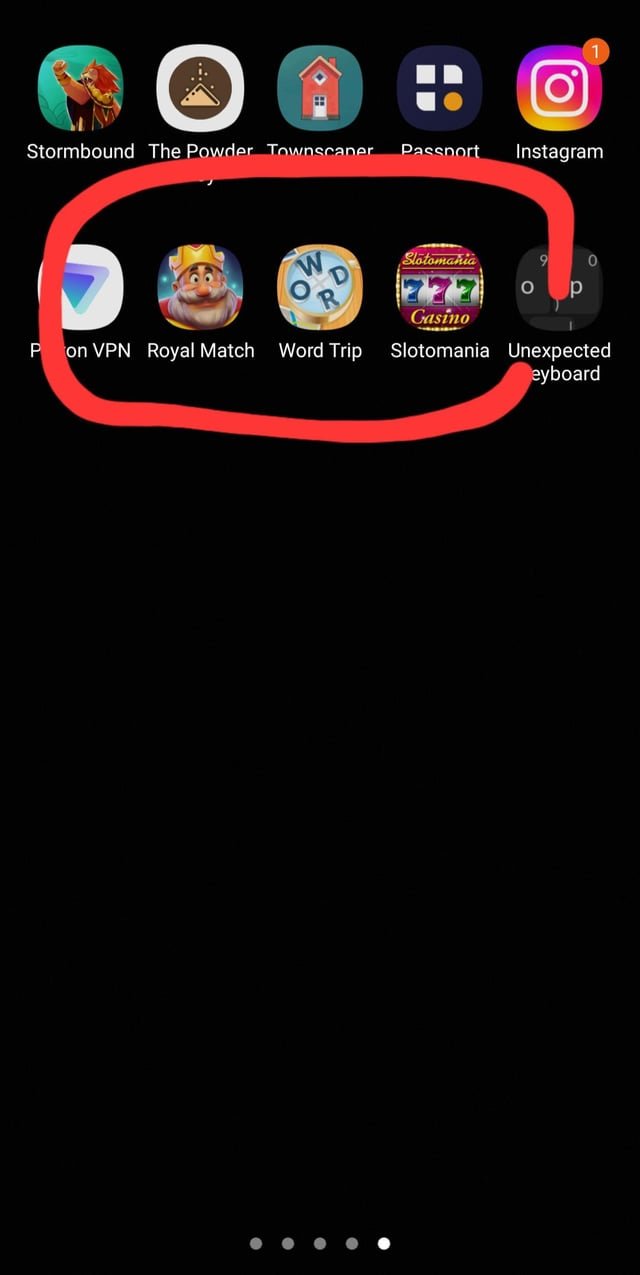
Apps you’ve previously authorized might be automatically installing associated games or you may have inadvertently clicked on a promotional banner leading to these installations.
Is your phone suddenly populated with games you never intended to download? It’s annoying when you find these unwanted apps appear without your consent. A common question many users have is “why are random games installing on my phone” and it’s a valid concern.
Often, this is because of permissions given to other apps or from clicking on sneaky advertisements. Sometimes a seemingly harmless app can include game installations in its code. This frustrating experience can make you feel a lack of control.

Why Are Random Games Installing On My Phone?
Have you ever picked up your phone and noticed a new game icon you don’t remember downloading? It’s like a little digital surprise – but not the fun kind! It can be confusing and a little frustrating to see these random games pop up on your device. This is a common issue many people face, and there are several reasons why this might be happening. Let’s explore some of those reasons so you can get to the bottom of this mystery.
The Sneaky World of Bundled Apps
Sometimes, the games aren’t exactly random. They might be “bundled” with other apps you download. Think of it like a surprise toy inside a cereal box. You might be looking for the cereal, but you get the toy (or in this case, a game) as a bonus. Many app developers team up with each other and include another app or game in their installation package. You think you are only downloading one thing, but you’re actually getting two (or more!).
How Bundled Apps Work
Bundling happens when app developers work together. When you install one app, the installation process may include other apps too, particularly games. These bundled games are often presented with an offer during the installation, such as “install this awesome game as well” which users may unintentionally agree to.
Where Bundled Apps Usually Hide
Bundled apps aren’t always from the official app stores. They tend to be found on third-party app stores or websites that offer free versions of apps. These places often include unwanted software as part of the free download.
The Case of the Permission Problem
Another reason for unexpected game installations could be related to app permissions. When you download an app, it asks for certain permissions on your phone. You might be asked if the app can access your photos, camera, location, or storage. Sometimes, apps request permission to install other apps. If you are not careful when granting these permissions, you may accidentally allow an app to install games without you knowing it.
Understanding App Permissions
App permissions are like keys to certain parts of your phone. When an app asks for permission, it’s like asking for the key to a certain lock. Some permissions are harmless and necessary for the app to work well, such as accessing your camera if it is a camera app, but some can be risky if you are not careful. It’s very important to only give apps permissions that make sense. Think to yourself, why would a simple calculator app want access to my camera? It shouldn’t, so don’t allow it!
How Permissions Can Lead to Unwanted Games
A tricky app might ask for “install other apps” permission, which is not a very common permission, but some apps have that permission. If you grant this permission without paying close attention, the app could install games behind your back, without your explicit consent or knowledge. It is important to understand what permissions you’re giving an app, otherwise they might be able to install unwanted programs or games.
Third-Party App Stores: A Risky Playground
Official app stores such as the Google Play Store and Apple App Store are generally safe places to get apps. However, third-party app stores are often less regulated and can be a hotbed for apps that install random games and other unwanted software.
Why Third-Party App Stores are Risky
These stores often have less security checks and quality control compared to official app stores. This means that apps with hidden agendas or malicious software are more likely to be found on these platforms. They can trick you with promises of free premium apps or modded games but they can cause lots of unwanted problems to your phone by installing unwanted programs or games. Think of them like a place where there are more bad apples, meaning apps that do bad things, so it’s safer to go to the store with the good apples.
Dangers Beyond Games
Besides installing random games, apps from third-party stores can also contain malware, viruses, or other forms of harmful software. This software can steal your information, slow down your device, or even cause it to break. It’s best to stick to official stores whenever possible and be very cautious when installing apps from third-party sources. You could accidentally install more than just games. Some of these apps can try to get your passwords, bank information, and other important data.
The Mystery of the Clickbait Ad
Those tempting ads you see while browsing websites or playing other games might be a cause of the unwanted installations. Sometimes, clicking on these ads can trigger a hidden installation process that installs a game on your device without your direct confirmation, or trick you into installing something with a tempting call to action, such as “Click to Win!”. These types of ads are designed to trick people to download and install applications without knowing about it.
How Clickbait Ads Can Trick You
These ads often use images or texts designed to catch your attention and make you want to click. Once you click, they can take you to a website with a download, which may also begin an installation. The game they install might be disguised to look like something else. It is important to ignore the clickbait and think carefully about what the ad is trying to make you do, or if the ad sounds too good to be true. If an ad is trying to make you install something very fast, that is a sign that it is probably malicious.
Avoiding Clickbait Ads
Try your best to avoid clicking suspicious or tempting ads, especially ones that show “you won” or “you are a lucky person!”. Avoid browsing on websites that are full of these types of ads. Install a good ad blocker on your device as it helps a lot to avoid these annoying ads. It is better to manually search for what you want to install using official app stores, instead of using links from ads.
Software Vulnerabilities: The Hidden Weak Spots
Sometimes, the problem isn’t with what you did, but with hidden weaknesses in your phone’s software. These weaknesses, or vulnerabilities, can be exploited by bad apps or programs to install software without you knowing. Think of it like an unlocked window in your house – someone might sneak in without you realizing.
What are Software Vulnerabilities?
Software, or the programs that make your phone run, is very complicated. Sometimes it has bugs or flaws that can be used for malicious reasons. These are software vulnerabilities. Sometimes software creators make mistakes that can cause security holes. These holes can let bad apps install other apps without your permission.
Staying Protected
The best way to protect yourself is to keep your phone’s software up to date with the latest updates. These updates often fix these vulnerabilities and security holes. It’s very important to regularly check for software updates, and it’s better to enable automatic updates. Remember to restart your phone from time to time to make sure the updates are working correctly. Also, try to not visit websites or download apps that look suspicious, as they might contain malware that is designed to exploit these weaknesses in your software.
The Sneaky World of Pre-installed Apps
When you get a new phone, it often comes with some apps already installed. These are called pre-installed apps. Sometimes, these can be games you didn’t ask for. Though these are not random they are unwanted. These games are usually installed by the manufacturer and can be a part of a promotion.
Why Phones Come with Pre-installed Apps
Manufacturers often make deals with developers to include their apps on new phones. This can help the app developers get more users, and manufacturers get extra money. They may also install games to encourage new users to start using their phones by showing a collection of apps they can use. While these are technically not random, they are unwanted for most users who don’t like the extra clutter.
Dealing with Pre-Installed Games
You might not be able to completely remove some of these pre-installed apps, but some apps can be uninstalled. You can go to your phone’s settings and uninstall unwanted games. If the option to uninstall is unavailable you can often disable them which means they will stay installed on your phone, but will not open or take up resources in the background.
The “Free” App Trap
Have you ever seen a “free” app or a “free” game and thought, “That sounds awesome?” Many apps appear to be free at first but they might come with hidden ways to earn money. Some free apps or games may include bundled software, permissions tricks, or hidden installations to make money off of your phone. They may also contain malware or other harmful software designed to steal your data or track what you do on your phone.
How Free Apps Can Install Other Games
Some free apps might look safe, but have hidden tricks inside. The app might have code that installs other games without your permission. Sometimes these games can try to install more apps or games if you accidentally click in the wrong place in the app or game, which generates a download behind your back. These free apps can also display ads designed to trick you into downloading unwanted software.
Think Before You Download
Always think twice before downloading something just because it’s free. Read reviews and check what permissions the app asks for. Use official app stores and avoid downloading apps from strange websites, or from links in emails or social media. If an app sounds too good to be true, it probably is. It’s better to be safe than sorry.
Infected Devices: The Worst-Case Scenario
If none of the other reasons seems to fit, then your phone might be infected with some kind of malware. Malware is like a computer virus, and it can do all sorts of bad things. It may be the reason why you’re seeing random games appearing on your phone.
Signs of Infection
If you think your phone might be infected, then look for the following signs. Is your phone running slower than usual? Are there apps that you don’t recognize? Are you seeing pop-up ads where you didn’t see them before? Does your phone’s battery drain quickly? All of these are signs that a virus or malware might be on your phone. If you see these signs, you need to take action right away.
What to Do If You Suspect Malware
If you think your phone is infected, the first thing to do is install an anti-virus app. Many antivirus apps are available, and they can scan your phone for malware and remove it. Always download an anti-virus app from an official app store. After you’ve installed the anti-virus, do a full scan of your device. If the anti-virus cannot remove the threat, then you may have to do a factory reset to remove the problem. Be very careful when downloading apps and try to avoid suspicious websites and links.
Keeping Your Phone Clean and Safe
Protecting your phone from unexpected game installations is very important. It helps to keep your device healthy, secure, and easier to use. Here are some good practices to follow to make sure your phone stays free from unwanted games.
- Only use official app stores: Stick to the Google Play Store (for Android) or the Apple App Store (for iOS). These stores have safety checks to help protect your phone.
- Be careful with app permissions: Always read the permissions before downloading an app. Only give permission to apps that actually need them.
- Avoid clickbait ads: Don’t click on ads that seem too good to be true. These can lead to unwanted downloads. Use ad blockers for your browsing activities.
- Keep your phone updated: Always make sure your phone’s software is updated to the latest versions. This will help to fix security issues.
- Be careful with free apps: Always be very careful when using free apps as they might be trying to make money in a hidden way. Only download trusted apps.
- Use anti-virus software: Keep an antivirus app installed on your device. Run regular scans to look for malware.
- Download from official sources: When it is possible, always try to download files from official sources such as official websites.
By taking these precautions, you can significantly reduce the chances of random games installing on your phone and ensure your phone stays secure.
Seeing random games pop up on your phone can be annoying and a bit scary. But by understanding why it happens, you can take steps to prevent it. Remember to stick to official app stores, be careful with permissions, and avoid those tempting clickbait ads. Keeping your phone safe and clean is important so you can enjoy it without unexpected and unwanted surprises.
How to stop apps from downloading by themselves on your Android device Samsung Motorola Kyocera
Final Thoughts
Malware, bundled apps, or permissions you granted are likely the main culprits. These can lead to unwanted downloads of games. Always verify app sources and be careful when granting permissions.
Review your installed applications and delete any you don’t recognize. Consider using security software. Remember, ‘why are random games installing on my phone’ is usually due to a security lapse. You must maintain good device hygiene.

