
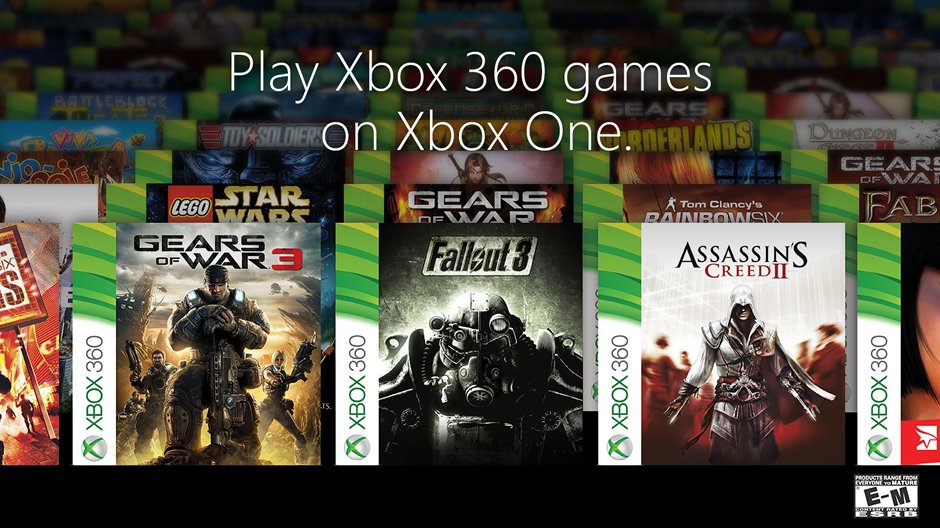
The Xbox backward compatibility program allows you to play select Xbox and Xbox 360 games on newer Xbox consoles.
Ever felt a pang of nostalgia for older games? That’s where the Xbox backward compatibility program shines. It bridges the gap between generations, allowing players to revisit beloved titles on their modern Xbox Series X/S or Xbox One consoles. This thoughtful feature ensures your past gaming purchases aren’t gathering dust.
The program carefully selects and updates older games, making them playable with improved performance on newer hardware. Players get a chance to replay favorites, and also introduce classic titles to new gamers. This program truly expands gaming experience.

Xbox Backward Compatibility Program: Play Your Old Favorites!
Have you ever wished you could play your old Xbox games on your new console? Well, with the Xbox Backward Compatibility Program, you totally can! It’s like having a time machine for your games. This cool program lets you play games from older Xbox systems – like the original Xbox and the Xbox 360 – on your newer Xbox One, Xbox Series X, or Xbox Series S. How amazing is that?
What is Backward Compatibility?
Think of it like this: imagine you have a bunch of your favorite toys from when you were younger. Now, imagine you could still play with them on your new playground! That’s basically what backward compatibility does. It allows newer game consoles to play games that were made for older consoles. So, instead of gathering dust in a box, your old game discs can be used again.
Why is Backward Compatibility Important?
There are many reasons why backward compatibility is a big deal for gamers:
- It Saves Your Games: Instead of your old game discs becoming useless when you get a new console, backward compatibility keeps them alive. You can keep playing all those favorites you’ve come to love.
- It Saves You Money: You don’t need to buy remastered versions or re-purchases of games you already own. You can just pop in the old disc, and play!
- It Preserves Gaming History: Backward compatibility helps us keep and remember all of those amazing games from the past. It’s like a library for video games!
- It Lets You Revisit Memories: Maybe you had a game you played a lot with your friends or family. Backward compatibility lets you go back and play those games, bringing back great times.
Which Xbox Games Work with Backward Compatibility?
Not every single game from the original Xbox and Xbox 360 works with backward compatibility, but there is a huge library of available titles. Microsoft has worked hard to add as many as they can. The list keeps growing, too, so it is worth checking every once in a while to see if a game you are hoping for is now available.
How to Check if a Game is Backward Compatible
It’s easy to check if your favorite older game can play on your newer Xbox:
- Check Online: Microsoft has a full list of backward-compatible games on its website. You can just search for “Xbox backward compatibility list” on your computer or phone.
- Look on the Game Case: If you have the physical game, check the game case. Sometimes it will say right on it if it is backward compatible.
- On Your Xbox: Just try putting the game disc into your console. If it is a compatible game, your Xbox will start to download the software needed to play it.
How Does Backward Compatibility Work?
This is where things get a little technical, but it’s cool to understand. The newer Xbox consoles are not exactly the same as the older ones. So, to make older games work, Microsoft uses a special software that pretends to be an older Xbox. It’s like teaching your newer Xbox to speak the language of the older games. This software is called an emulator, and it acts as a translator between the game and your console. Here’s the basic idea:
- Emulation: The emulator recreates the environment of the original Xbox console, so that the older game thinks it’s running on its original hardware.
- Software Magic: The emulator makes sure the game’s instructions are understood and correctly performed by the newer Xbox.
- Updates and Enhancements: Sometimes, the emulator even improves the older games! This can include things like better picture quality and smoother performance.
Playing Your Backward Compatible Games
Playing your old games is as simple as:
- Insert the Disc: If you have a physical copy of the game, just put the disc into your Xbox console.
- Download the Game: If the game is backward compatible and you have the disc, your console will download the digital version of the game. It’s like a digital copy license, where your disc serves as the key. This allows you to play without the disc after it is installed.
- Start Playing: Once the game is downloaded, you are ready to play! You can use your regular controller.
- Digital Games: If you bought the games digitally in the past, most of these digital titles will automatically show up in your “Ready to Install” section of “My games & apps” section.
Original Xbox Games on Newer Consoles
Many fans are very excited that original Xbox games can be played on newer consoles. It’s like a big trip back in time. A lot of well-known and fondly remembered titles from that era can now be experienced again. Games such as “Star Wars: Knights of the Old Republic,” “Ninja Gaiden Black,” and “Crimson Skies” are included on this list.
Special Features for Original Xbox Games
Some original Xbox games even get little upgrades when played on the newer Xbox:
- Improved Resolution: Games look sharper and clearer than they did originally.
- Better Performance: The games often run smoother, with faster loading times.
Xbox 360 Games on Newer Consoles
The list of backward compatible Xbox 360 games is huge. This includes lots of fan favorites. This means many people are re-visiting classics like “Mass Effect,” “Fallout 3,” and “Red Dead Redemption.”
Benefits of Playing Xbox 360 Games
Playing your old Xbox 360 games on a newer console has a lot of advantages:
- Improved Graphics: Some games have higher resolution on newer Xbox consoles.
- Faster Loading: Loading screens are shorter, so you can start playing sooner.
- Better Performance: Many games run with higher frame rates, making them smoother.
Backward Compatibility and Xbox Game Pass
The backward compatibility program works really well with Xbox Game Pass. Xbox Game Pass is like a library of video games that you pay a monthly fee to use. Many backward compatible games are available on Xbox Game Pass. This means you don’t need to own the games separately; you can just download and play them as long as they are part of the Game Pass. This is another way that backward compatibility gives more value to players.
How Game Pass and Backward Compatibility Help Gamers
- More Games to Play: If you have Xbox Game Pass, you’ve got a lot of different games from different generations to choose from.
- Easy Access: Games are available to play right away if they are included in Game Pass, without having to search for your old disks.
- More Value: The combination of Game Pass and backward compatibility means you get to play more for your money.
Are there any drawbacks to backward compatibility?
While the Xbox backward compatibility program is great, there are some things to know:
- Not All Games Work: Not every single game from the original Xbox and Xbox 360 works with the program. So your very favorite game might not be available.
- Licensing Issues: Sometimes, it can be hard for Microsoft to get the rights to make a game compatible with the program. This is because the rights might belong to different companies or studios now.
- Performance Variations: Even though a game might be compatible, it doesn’t always run perfectly. Sometimes the game might not run quite as well as it did on the original hardware.
The Future of Backward Compatibility
Microsoft has made it clear that they will continue to support backward compatibility. They are working to add more games to the program. This dedication makes us feel positive about the future, knowing we’ll have the ability to keep playing old classics. It also means more people are getting introduced to older games that are important to the history of gaming.
Tips for Enjoying Backward Compatible Games
Here are a few tips to make the most of backward compatible games:
- Keep Your Disc Clean: If you play physical games, make sure your game discs are clean and scratch-free. A dirty or damaged disc might not read properly on your console.
- Check For Updates: Before you start playing, make sure your Xbox console and the games are up to date. This will help ensure things run correctly.
- Look for Enhancements: Sometimes, backward compatible games have extra features. Take a moment to explore these. They can greatly increase your enjoyment.
- Join online communities: Other players might be experiencing the same games. Sharing tips and experiences on message boards will greatly improve your experience and you’ll be introduced to new perspectives.
How backward compatibility helps new players
The backward compatibility program is also a great way for new players to jump into older games they’ve never experienced before. It’s a fun way to see where certain game series came from and to see how much gaming technology has changed over the years. By being able to play the older games, new players can understand the evolution of gaming more deeply.
How backward compatibility helps the older players
For players who have been playing games for a long time, backward compatibility lets them re-experience games they love. It’s a great way to go back in time to games that hold special memories, and it helps to connect the player with their history in the hobby.
The Xbox backward compatibility program is a fantastic way to experience your favorite games again or discover new games from the past. It is a really cool feature for all Xbox players to check out.
Xbox Backwards Compatibility 2024 Update!
Final Thoughts
The Xbox backward compatibility program greatly benefits players by providing access to a vast library of older titles. This feature lets you experience classic games on modern consoles. You do not need to dust off old systems, it’s great for saving space.
Xbox’s commitment to the backward compatibility program shows a dedication to preserving gaming history. Players can revisit many favorite games. This system makes older games more accessible than before. This is why many value the service it provides.

