
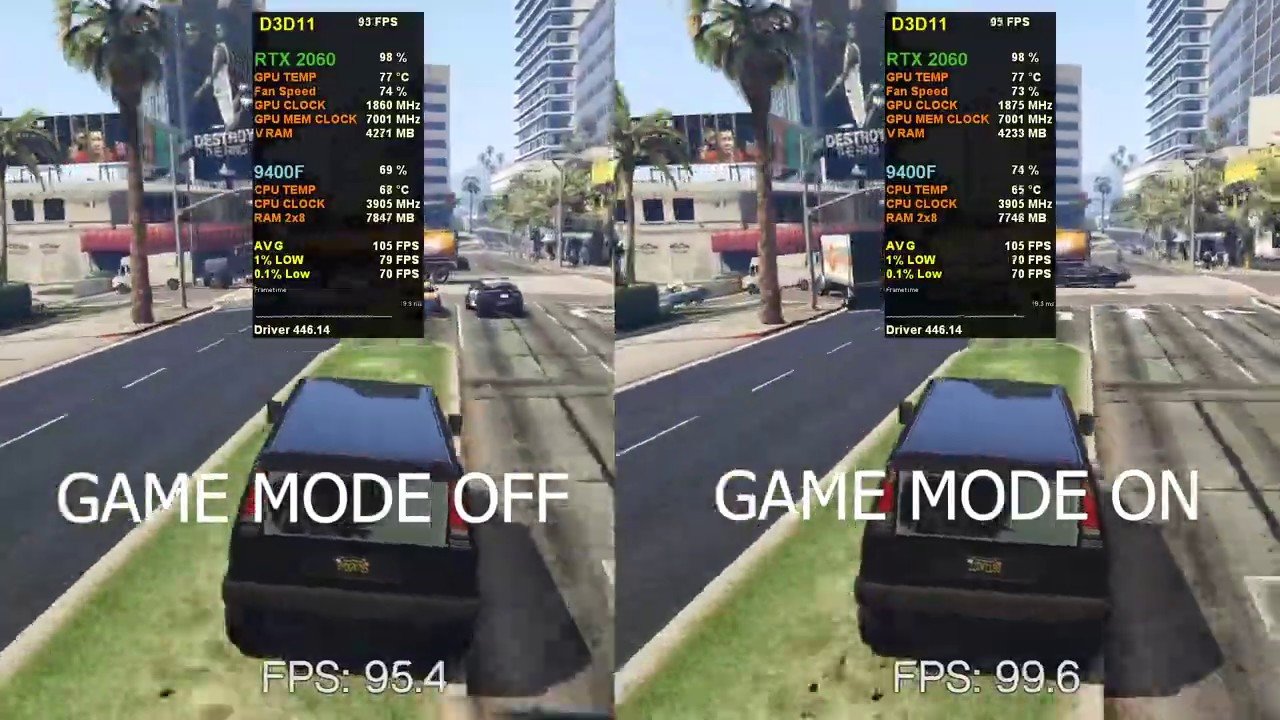
Game mode should be on when gaming, and off for general use.
Ever find yourself pondering, “should i have game mode on or off?” It’s a common question for gamers and casual users alike. Game mode, designed to optimize performance, can sometimes interfere with other tasks.
The trade-off between dedicated gaming focus and regular functionality often creates confusion. Understanding when each is appropriate enhances user experience. Knowing when to toggle game mode really helps.

Should I Have Game Mode On or Off?
Okay, so you’ve probably seen the “game mode” setting on your TV or computer, and you’re wondering if you should even bother with it. It’s a valid question! Game mode is designed to improve your gaming experience, but is it always the best option? Let’s dive in and figure out when to use it and when to leave it off.
Understanding Game Mode
First, let’s understand what game mode actually does. It’s not some magic button that instantly turns you into a pro gamer. Instead, it’s a setting that focuses on reducing something called input lag. Input lag is the delay between when you press a button on your controller (or keyboard/mouse) and when you see that action happen on the screen. This delay can be really frustrating, especially in fast-paced games. Game mode basically tells your display to turn off some of its image processing features to reduce this lag.
What Does Image Processing Do Anyway?
Your TV or monitor usually uses a bunch of clever tricks to make images look better. These tricks, known as image processing, include things like:
- Motion Smoothing: Makes fast action look smoother, but can add input lag.
- Noise Reduction: Clears up grainy or blurry images.
- Sharpness Enhancement: Makes edges look more defined.
- Color Correction: Adjusts colors for a more vibrant picture.
While these are great for movies and TV shows, they can add milliseconds of delay between your actions and the on-screen result, making games feel sluggish. Game mode tells your display to shut down or minimize these features, prioritizing responsiveness over picture quality. This is done by bypassing these extra layers of image processing, so your actions show up faster. That can be helpful when you are playing games like, fighting games, racing games and FPS games.
When to Use Game Mode
So, when should you be reaching for that game mode button? Here are some scenarios:
Fast-Paced Games
This is where game mode really shines. If you’re playing games where quick reactions are important, like:
- First-person shooters (FPS) such as Call of Duty, Battlefield or Fortnite
- Fighting games such as Street Fighter, Tekken, Mortal Kombat
- Racing games such as Forza or Need for Speed
- Platformers that require quick, precise jumps
- Fast paced action RPGs, such as Bloodborne, Devil May Cry or Sekiro
In all these fast paced games, you’ll appreciate the reduced input lag. Even a small amount of lag can make the difference between winning and losing. It can help you land your shots with much more accuracy, time your blocks and dodges more precisely, and feel in control when you make quick movements. Even if you are a casual gamer, by playing in game mode, you’ll feel much more control over the game you are playing.
Competitive Gaming
If you’re playing online against other people, especially in a competitive setting, using game mode is almost a must. Every millisecond counts when you’re facing off against other skilled players. Input lag is a big disadvantage that you don’t want to have. Without it, the better your reaction time is, the better your performance is gonna be.
Any Game Where Precision is Key
Even in games that aren’t necessarily fast-paced, if precision is important, like puzzle games or games with complex platforming, game mode can still be beneficial. For example, even if a platformer doesn’t have extremely fast sequences, the slight delay introduced by the image processing can mess up your timing for a precise jump, for example.
When to Leave Game Mode Off
Game mode isn’t perfect for everything. There are times when you might want to turn it off.
Watching Movies and TV Shows
When you’re relaxing with a movie or binging your favorite show, picture quality is usually more important than a very low input lag. The image processing features that game mode turns off can actually make movies and TV shows look much better. Motion smoothing, for instance, can make the action feel smoother, and noise reduction can make images clearer. If you are watching a movie or TV show that is very bright or colorful, the color correction that your display usually adds will be beneficial. These picture enhancements will be lost when playing games.
Slow-Paced or Turn-Based Games
In these types of games, a little bit of input lag usually isn’t a big deal. If you’re playing a game with:
- Turn-based strategy games, such as Civilization or XCOM
- Slow-paced RPGs such as older Final Fantasy games or Elder Scrolls series
- Puzzle games with slow, methodical gameplay
- Any type of simulation games
You probably won’t even notice a difference whether game mode is on or off. In this case, you might enjoy having the best picture quality the display can offer, which comes when game mode is off.
Non-Gaming Use
If you’re using your display for everyday tasks, like browsing the web, working on documents or watching videos on YouTube, game mode is not needed. In this case you are probably better off turning it off and taking advantage of the image processing features, especially for color accuracy if you are working on color grading or making art.
The Trade-Off: Picture Quality vs. Input Lag
The main thing to understand about game mode is the trade-off: lower input lag for slightly reduced image quality. When you turn on game mode, your display sacrifices some of its picture quality features in order to make games feel more responsive. This reduction of the input lag allows you to see the game as you play, with the minimum delay between your controller and the screen. When turning it off, your display prioritizes image quality. Some of the extra features that add input lag can make the games look better. The trick is to find the right balance for what you need, for a specific game or any other purpose.
What You Might Notice With Game Mode On
- Slightly less vibrant colors: Because color correction is minimized.
- Reduced motion smoothing: Making fast movements appear more choppy.
- Less sharpness: Images may look slightly less defined.
What You Might Notice With Game Mode Off
- Increased Input Lag: The game can feel less responsive.
- More motion blur: When playing fast paced games, the image will feel blurry when moving the camera.
- The game might feel sluggish: In fast paced games, your actions might feel delayed.
How to Enable Game Mode
The way you turn on game mode varies depending on your specific device. Here’s a general idea of where to look:
On TVs
Most TVs have game mode in the picture settings. You may find it listed as:
- Game Mode
- Game Picture Mode
- Low Latency Mode
- Input Lag Reduction
Look in the menu, under picture settings, advanced settings, or general settings. Your TV remote usually has a menu button that can bring up those settings.
On Monitors
Computer monitors also often have a game mode. Look for it in the on-screen display (OSD) menu, which can usually be accessed using buttons on the monitor itself.
On Consoles
Some consoles have settings that can be configured to automatically turn on game mode on the TV when a game is launched, or when the game mode is enabled on the console itself. It’s usually in the console’s settings, under display or video options.
Other Factors to Consider
Besides the presence of game mode, there are other factors that affect input lag and game performance, such as:
Display Refresh Rate
The display refresh rate is how many times the screen updates per second. Higher refresh rates (such as 120Hz or 144Hz) reduce motion blur and improve responsiveness, which is helpful for gaming. A refresh rate of at least 60hz is suggested for smooth gaming experience. If you have the possibility, opt for a display that features higher refresh rate.
Response Time
This is how fast pixels on your display change colors. Faster response times reduce ghosting, and are usually measured in milliseconds (ms). Lower response times are better for gaming, usually less than 5 ms is very good.
HDMI Cables
Make sure you’re using high-quality HDMI cables, especially if you have a high-resolution display or are playing at higher refresh rates. They will provide the best gaming performance, and make the most of your display’s and console’s capabilities.
Game Settings
In some games, there are specific graphical settings that affect performance. Turning down some of these settings can reduce input lag and improve frame rate. There are a lot of factors to consider when talking about game settings, and they depend on the game you are playing, and the type of PC or console you are using. Try to experiment with different configurations to find what is the best for you.
Experiment and Find What Works Best
The best approach is to experiment. Try turning game mode on and off while playing the same game to see if you notice a difference. Everyone’s sensitivity to input lag is different, and what works for one person may not work for another. Don’t be afraid to play around with the settings on your display and find what gives you the best overall experience. Sometimes, turning on game mode is the best, and sometimes leaving it off is the best, for certain games, devices, or even your personal preference.
In conclusion, deciding if game mode should be on or off comes down to what you’re doing on your display. For fast-paced games or any kind of competitive gaming, turn it on to reduce input lag and boost responsiveness, you will feel in control. However, if you are watching a movie, or playing a slow-paced game, then picture quality is usually better, so leave it off. Experiment with it, and you’ll find the best way to game.
Windows Game Mode On vs Off – Does it work? FPS Boost? | Gaming PC Guides, Tips and FAQ 2024 – #6
Final Thoughts
Ultimately, whether you turn game mode on or off depends on your specific setup and preferences. If you prioritize the absolute lowest input lag, and your game runs smoothly without it, you must test having it off.
However, for many, game mode offers a significant performance boost. The reduction in input lag can make a noticeable difference to gameplay. You should always experiment to see what works best.
So, the decision of ‘should i have game mode on or off’ really comes down to personal experience. Try both settings in your favorite game and see which one feels better.

